
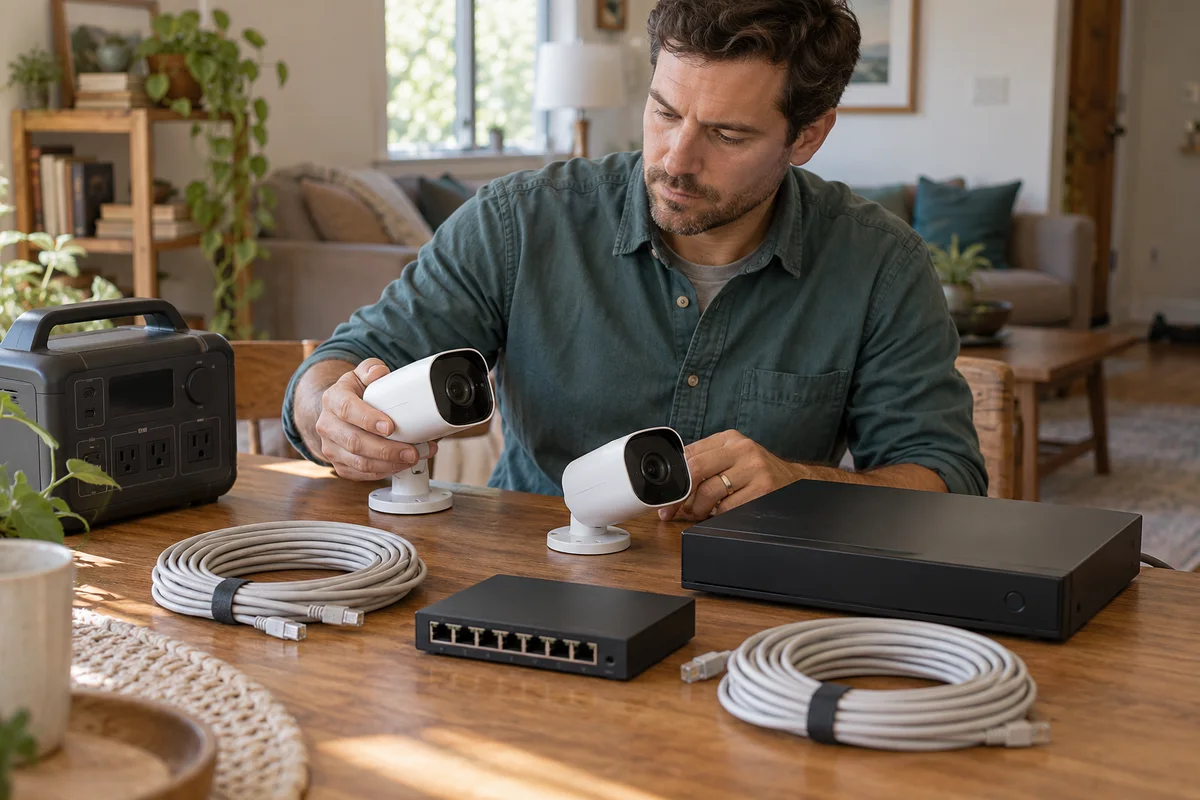
AI-generated scene illustration; not a photograph of the recommended product.
A homeowner sees a camera’s small wattage and expects a portable station to keep the whole security system operating through an outage. But the camera receives power from a recorder or switch, and the recordings depend on equipment somewhere else in the house.
For an Elite 100 V2 purchase, draw that system before dividing watt-hours by a camera label. A local recording task and a remote notification task do not have the same power or network requirements.
The short answer
Back up the supported supply chain, not an isolated PoE camera specification. Depending on the arrangement, that may include the NVR and its adapter, a separate PoE switch or injector, cameras and any networking required for the intended function.
Elite 100 V2 is not automatically qualified as a continuity solution for a recorder. Its fast-transfer headline and capacity do not certify recording integrity, restart behavior or remote alerts. Obtain exact-system guidance and compare a suitable supported UPS when continuity is important.
Contents
- The short answer
- The power map
- Local and remote functions
- The load budget
- Capacity and continuity
- The system worksheet
- Qualification and recovery
- Placement and maintenance
- Buying advice
- Frequently asked questions
- Sources and verification
The power map
Reolink’s powering guide describes supported routes through a PoE NVR, injector or switch, with model-specific alternatives. Identify which route the home actually uses.
Draw each powered device and its supply. In one arrangement, the NVR’s PoE ports supply the cameras. In another, a separate switch supplies them while the NVR records over the network. The list of equipment needing reserve can therefore differ.
Include the approved power adapters rather than assuming that Ethernet-shaped connections mean every device receives PoE. A recorder’s port and a camera’s powered port are not interchangeable roles.
This is a procurement map, not a wiring tutorial. Do not modify adapters, probe Ethernet conductors or create a direct DC connection from the station to a device without exact manufacturer approval.
Local and remote functions
Reolink’s outage guide distinguishes device types and power versus internet conditions. Do not assume every camera has an internal battery or identical offline behavior.
Define the required outcome. Keeping an appropriate local recorder powered is different from receiving a phone alert while away. Remote access may also require the router, modem or optical-network equipment and an available service outside the property.
A powered camera does not prove a recording is being saved. A powered recorder does not prove that every required camera is connected. A working local system also does not prove that an internet outage has been solved.
Our router and laptop reserve guide covers the general connectivity chain. This article adds PoE topology and the recorder’s distinct recording responsibility.
The load budget
Do not total only the camera labels and call the result the system load. The NVR’s mainboard, storage and power supply also consume energy; a separate switch or injector adds its own requirement.
Reolink’s PoE usage explanation specifically notes the NVR’s HDD and mainboard. Its camera-port information is useful without becoming a complete wall-energy measurement.
Distinguish PoE output to cameras, an adapter’s maximum rating and representative AC consumption of the whole supported arrangement. They are related quantities, not interchangeable readings.
Use an appropriate existing consumption record or qualified measurement method without opening equipment or disturbing an active system. Camera lights, spotlights and movement features can change demand, so one quiet daytime observation may not represent the intended overnight task.
Capacity and continuity
Elite lists 1,024Wh capacity in its US manual. That is nameplate battery energy, not a measured number of recording hours.
Usable reserve, conversion, station consumption, starting charge and the complete load affect duration. Do not divide capacity by one camera’s nominal watts and promise a night of recording.
The same manual restricts devices such as servers or workstations requiring high-performance UPS protection. A home recorder’s label does not by itself settle whether the intended continuity requirement is acceptable. Obtain a precise answer for the actual recorder and supply arrangement.
If the requirement is uninterrupted recording or data integrity, compare an appropriate manufacturer-supported UPS and recovery plan. Do not cascade a UPS and station as an assumed workaround for an unresolved restriction.
The system worksheet
| Field | Record before purchase |
|---|---|
| Cameras | Exact models and supported power route |
| PoE source | NVR, switch or injector and its approved adapter |
| Recorder | Model, storage and supported power requirements |
| Network | Equipment needed for local and remote functions |
| Energy | Representative complete-system demand |
| Continuity | Permitted transfer and recovery arrangement |
| Ownership | Reserve upkeep, alerts and responsible user |
Keep the worksheet private. Household camera placement, account details and network information need not appear in public support posts or product-review photographs.
If an added camera changes the total load or PoE budget, revisit both the camera supply and reserve calculation. A spare physical port does not establish enough supported power capacity for every device.
Qualification and recovery
Follow the recorder and camera manufacturers’ supported setup and verification instructions. Complete appropriate noncritical qualification before relying on the arrangement for an important household requirement.
Check the actual saved recordings and supported recovery behavior, not merely illuminated screens or connection icons. This article has not performed a transfer, reboot, recording-integrity or outage test.
Do not deliberately interrupt valuable recordings to reproduce an internet demonstration. Preserve important material and obtain appropriate support if the system already shows gaps or restarts.
A power purchase is only one part of a recording plan. Suitable storage, maintenance and authorized access remain separate. More battery capacity cannot repair a failing disk, an unsupported camera or an unavailable remote service.
Placement and maintenance
The station and ordinary indoor networking equipment need their instructed dry environment and ventilation. An outdoor camera’s weather rating does not transfer to its indoor adapter, recorder or portable station.
Avoid sealed cupboards, cable strain and household routes where people can disturb connections. If the current location is unsuitable, redesign that location before buying reserve capacity.
Assign responsibility for checking station readiness and system status. An energy reserve that is discharged by unrelated household tasks may no longer cover the intended camera task.
Review the plan after changing a recorder, disk, adapter, switch or camera. The earlier qualification applies to the earlier arrangement; it is not permanent approval for every later expansion.
Buying advice
Investigate Elite only when the exact supported load and continuity requirements are qualified, the full chain is practical and a portable reserve genuinely suits the household.
Choose a suitable supported dedicated UPS or another purpose-designed arrangement when the recording requirement demands it. Pass on a station purchase justified by a single low camera-watt figure or a promise of remote alerts during any outage.
The partner CTA is for Elite hardware, not a Reolink system, PoE switch or security-service guarantee. Confirm current seller contents and support. No camera compatibility, retention duration or protection outcome is promised by this document comparison.
Frequently asked questions
One camera’s watts?
They do not describe the entire system. Include recorder, storage, supply losses and separate networking as applicable.
PoE from Elite?
Do not treat station ports as a qualified PoE injector. Preserve the supported camera-supply equipment.
Offline alerts?
Local recording and remote notifications are different functions. Power cannot guarantee an unavailable internet service.
Fast switch equals integrity?
No. A transfer specification does not certify the recorder’s actual continuity or file-integrity requirement.
Sources and verification
Checked November 2, 2026. Official system-topology and power guidance only; no camera system or continuity test.
- Reolink supported PoE power routes
- Reolink power and internet outage behavior
- Reolink PoE-port usage and NVR overhead
- Elite 100 V2 US manual
Keep reading
Related guides
 Home Tech & Audio
Rokid Max 2 Streaming: A Working Menu Is Not Enough
Verify Max 2 streaming with the exact service, source and supported connection rather than treating a visible desktop as protected-playback proof.
Read guide → Home Tech & Audio
Rokid Max 2 Blackout Cover: Shade Is Not Dimming
Separate Max 2's removable blackout cover from electrochromic dimming and decide whether an opaque seated-viewing setup fits your room.
Read guide → Home Tech & Audio
Rokid Max 2 Screen Anchoring: Check the Companion
Distinguish a simple connected display from a supported Station 2 spatial-screen setup before expecting head-tracked anchoring.
Read guide →