
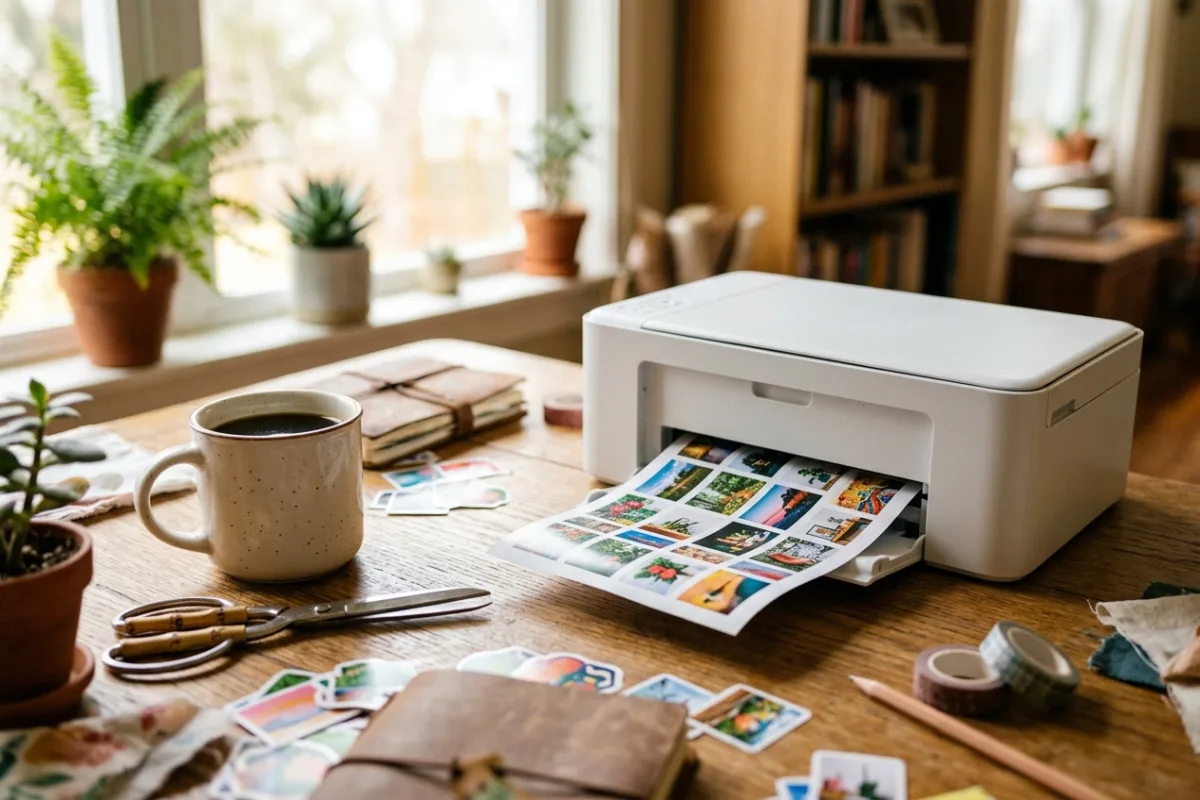
Your kid's water bottle, planner, and laptop lid are all bare, and the vinyl sticker packs at the craft store never quite match the photo you actually want on them. Making a custom sticker from your own photo usually means printing on adhesive paper, then hand-cutting around the outline with tiny scissors, only to end up with jagged edges and a sticky mess. A separate cutting machine like the ones used for vinyl decals adds another device, another software step, and another learning curve just to get a clean edge. What you actually want is to pick a photo on your phone, tap print, and peel off a finished sticker a couple of minutes later.
This review is built from published manufacturer specifications and the current product documentation for the photo sticker printer and cutter category, not from a laboratory test bench. It compares the Liene PixCut S1 Photo Sticker Printer and Cutter against the rivals a shopper actually sees beside it, for one clearly defined household job.
The verdict
For anyone who wants a custom photo sticker without assembling a printer, a cutter, and a laminator, the Liene PixCut S1 is the strongest option in this category because it is one of the only widely available machines that prints, laminates, and cuts a finished sticker in a single automated cycle. The manufacturer's AI Image Extraction step also removes backgrounds and generates the cut line automatically, so there is no separate design software or manual contour tracing before you can cut. Combined with a listed 300 x 300 DPI dye-sublimation print engine and a fine-point carbide blade rated for hundreds of cuts, it is built to produce gift-shop-quality stickers repeatedly rather than as a one-off craft project.
Check the current listing →Liene PixCut S1 Photo Sticker Printer and Cutter at a glance
These are the published specifications that matter most for the use case above. Manufacturers revise hardware between production runs, so confirm the current listing before ordering.
| Print Technology | 4-layer dye-sublimation thermal transfer (D2T2), 300 x 300 DPI, 16.7 million colors |
|---|---|
| Print & Cut Cycle Time | About 59 seconds to print, laminate, and cut one sticker or photo sheet |
| Supported Paper Sizes | 4 x 7 in. sticker paper and 4 x 6 in. photo paper cartridges |
| Cutting Blade | Cemented carbide fine-point blade, 45-degree angle, 1.0mm tip, single-axis speed up to 2 ips |
| Connectivity | Bluetooth 5.0, pairs with up to 3 devices, Liene app for Android 4.1+ and iOS 9.0+ |
Why it wins this category
A better spec sheet is only useful when it removes work from a real routine. These are the four places where the Liene PixCut S1 Photo Sticker Printer and Cutter changes the outcome rather than the marketing copy.
All Three Steps In One
Most photo stickers require a separate printer, a cutting machine, and a laminator, then careful alignment between each device. The PixCut S1's print-laminate-cut process runs as one automated cycle, so a finished, waterproof sticker sheet comes out the other side in about a minute without you touching a blade, weeding tool, or transfer tape.
AI Cuts Without Tracing
Standalone cutting machines still need you to import an image, trace or manually set a cut path, then load the material by hand before cutting starts. Liene's AI Image Extraction detects the subject, strips the background, and generates the cut line automatically from a phone photo, removing the design-software step that trips up first-time crafters.
Photo-Grade Color, Not Zink
Pocket photo printers that use Zink paper skip ink but cap out at lower resolution and a narrower color range. The PixCut S1's dye-sublimation engine lays down 16.7 million colors at 300 DPI across 256 tonal shades per channel, so skin tones and gradients in a real photo hold up instead of looking flat or banded.
Built-In Waterproof Lamination
A cutter paired with a home inkjet still leaves a sticker exposed to water, sunlight, and scuffing unless you add a separate laminating sheet by hand. The PixCut S1 applies its lamination layer automatically during the same cycle, so every sticker that comes out is already fade-resistant and waterproof for a water bottle or laptop lid.
How it compares to the alternatives
Each of these is a capable product with a real audience. The question is not whether they work, but which one fits the job described above with the least compromise.
Canon IVY 2 Mini Photo Printer
pocket-sized Zink photo printer for instant sticky-back prints
Where it is strong: The IVY 2 is genuinely pocket-sized, prints in under a minute with no ink cartridges thanks to Zink paper, and recharges quickly, making it an easy grab-and-go printer for parties or nights out.
Where it falls short here: It has no cutting function at all, so every print stays a plain rectangle or a pre-cut shape from Canon's own Zink stock; turning a photo into a custom-contour sticker still means finishing it with scissors by hand.
Cricut Joy Xtra
compact smart cutting machine for vinyl, cardstock, and iron-on
Where it is strong: The Joy Xtra cuts a far wider range of materials than photo paper alone, including vinyl, cardstock, and iron-on, and its Design Space app opens up thousands of ready-made craft projects beyond stickers.
Where it falls short here: It only cuts, so a photo still needs to be printed on adhesive paper with a separate printer first, then manually aligned and loaded onto a cutting mat before the machine can trim around it.
Brother ScanNCut SDX85
compact electronic cutting machine with a built-in scanner for craft materials
Where it is strong: Its built-in scanner and Auto Blade sensor let it read a hand-drawn shape or a thicker material like felt or foam and adjust cutting depth automatically, which is more versatile than a photo-only cutter.
Where it falls short here: It has no printing capability whatsoever and sits well above entry-level pricing, so you still print, color-match, and place a photo on the mat yourself before any cutting happens.
Weighed against those three, the Liene PixCut S1 Photo Sticker Printer and Cutter remains the one that covers this scenario end to end without asking you to accept a workaround somewhere else.
Who it fits
Parents Making Custom Labels
If you are labeling lunchboxes, water bottles, or school supplies with a child's own photo or drawing, the one-step print-laminate-cut cycle turns a phone photo into a durable, waterproof sticker in about a minute, without buying a separate laminator for a handful of labels.
Small Etsy Sticker Sellers
For someone selling custom photo stickers in small batches, the dye-sublimation print quality and automatic lamination mean each sheet is sale-ready straight off the machine, and the rated blade life supports steady production runs without a full commercial cutter.
Scrapbookers Wanting Clean Edges
If jagged hand-cut edges have kept your photo stickers out of scrapbooks and planners, the AI-generated cut line follows the actual subject outline instead of a rough rectangle, giving a cleaner finished edge than trimming with craft scissors.
What to be realistic about
No product is the right answer for every household. Skip this one, or plan around these points, if any of them describe your situation.
- Skip this if you need to cut fabric, wood, leather, or vinyl decals, since the PixCut S1 only works with its own sticker and photo paper.
- Skip this if you need dozens of stickers printed daily, since the roughly one-minute cycle and small paper sizes suit home and small-batch use, not volume production.
- Skip this if you already own a printer, laminator, and cutting machine that work well together, since this device only consolidates those three tools into one.
Living with it after week one
Set the PixCut S1 on a flat surface near an outlet and pair it with the Liene app over Bluetooth the first time you use it. Load a cartridge of 4x6 photo paper or 4x7 sticker paper, pick or shoot a photo in the app, let AI Image Extraction isolate the subject, and confirm the cut line before printing. Each cycle prints, laminates, and cuts automatically in about a minute. Store spare paper cartridges flat and away from humidity, wipe the exterior with a dry cloth, and swap in a fresh cartridge once one runs low so prints keep matching the app preview.
Frequently asked questions
Does the Liene PixCut S1 need ink cartridges?
No. It uses dye-sublimation thermal transfer, where color is baked into the paper itself through heat rather than sprayed on as liquid ink. You load paper cartridges that already contain the dye ribbon and adhesive backing, so there is no separate ink tank, cartridge, or nozzle to replace or clean.
Can it cut materials other than its own photo and sticker paper?
According to the manufacturer's published specifications, the cutting system is designed around Liene's own 4x6 photo paper and 4x7 sticker paper cartridges. It is not positioned as a general craft cutter for vinyl, fabric, or cardstock the way a dedicated cutting machine is.
How durable are the finished stickers?
Liene lists the finished stickers as waterproof, fade-resistant, and scratch-resistant thanks to the automatic lamination layer applied during the print cycle, which is intended to hold up on water bottles, laptops, and other everyday surfaces exposed to handling and moisture.
Keep reading
Related guides
 Maker & Craft
Anycubic Kobra X: A Multicolor 3D Printer For Weeknight Maker Projects
A budget 3D printer for parents and hobbyists who want school projects, tabletop miniatures, and craft props printed in multiple colors without buying separate color-swapping hardware.
Read review → Maker & Craft
Creality K2 Combo Review: Enclosed Multicolor 3D Printing for Makers
For makers moving past PLA-only open-frame printers, this enclosed combo bundles automated four-spool color switching with a printer built to handle warp-prone engineering filaments.
Read review → Maker & Craft
ELEGOO Saturn 4 Ultra 16K: A Resin Printer For Fine-Detail Miniatures
For hobbyists printing tabletop miniatures and cosplay props, the ELEGOO Saturn 4 Ultra 16K delivers finer resin detail and fewer failed prints than similarly priced resin printers on the market.
Read review →