
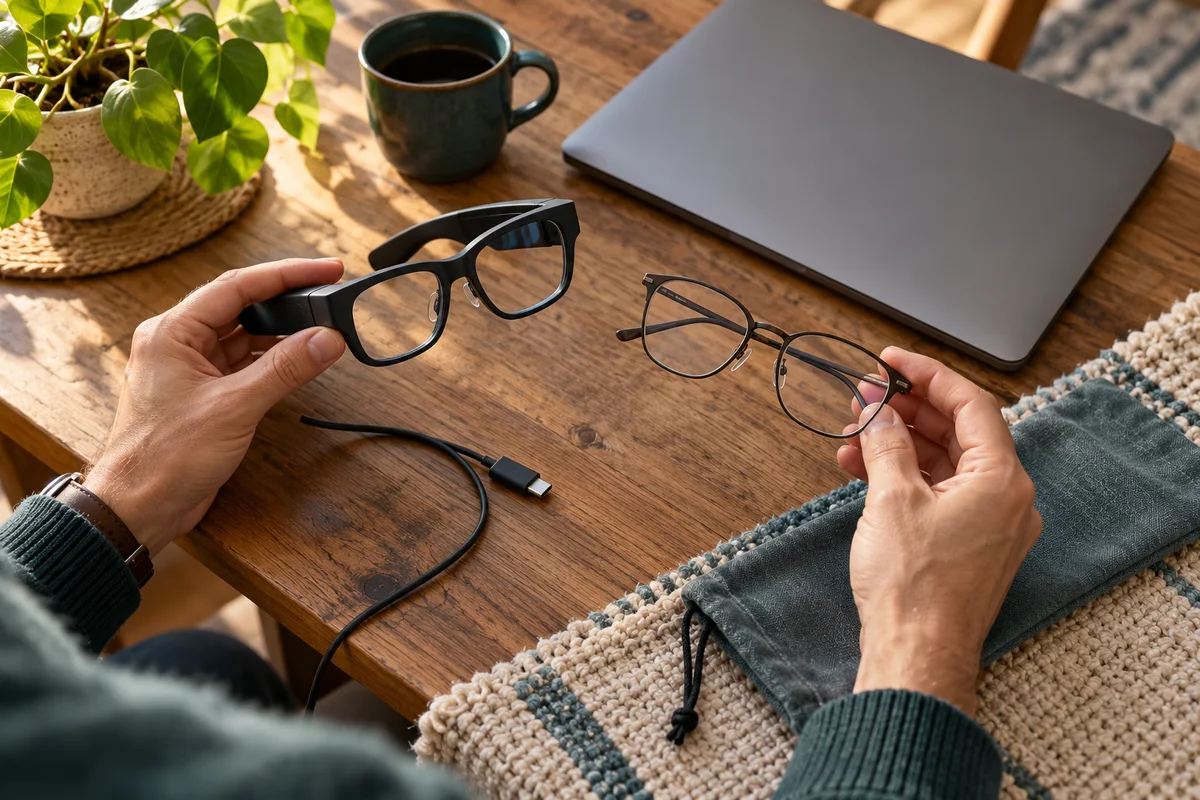
AI-generated scene illustration; not a photograph of the recommended product.
A relative sends a video about smart glasses that answer questions. Later, you see Rokid Max 2 on a partner listing and recognize the same brand. The frames look like glasses, the language mentions technology, and it is easy to assume the two products do the same thing.
That is the point to stop and name the task. Connected display glasses for viewing a screen are not interchangeable with camera-and-assistant eyewear. Even “glasses with a display” can describe very different uses.
The short answer
Shortlist Rokid Max 2 for a compatible connected-display task, such as viewing supported content from the intended host. Do not infer the functions of Rokid’s separate AI eyewear lines from the shared brand or frame shape.
Rokid’s current catalog distinguishes Max 2 in its AR line from “Rokid Glasses (With Display)” and “Rokid Ai Glasses Style (Non-Display).” Those labels are important: the existence of a display does not establish the same screen function, and a non-display model is not a substitute for a Max 2 viewing task.
Contents
- The short answer
- Write a task that a seller can confirm
- Keep three categories separate
- Check the complete Max 2 package
- Do not move accessories across the brand by appearance
- Treat AI-service expectations as a separate purchase
- Give fit and return conditions real weight
- Make the category decision before the deal decision
- Frequently asked questions
- Sources and verification
Write a task that a seller can confirm
Replace “I want smart glasses” with a concrete sentence. For example: “I want to watch supported content from this specific laptop while seated at home.” That gives the seller a host, a task, and a setting to verify.
A different sentence—“I want hands-free capture and assistant functions while out”—points to another product evaluation. It does not become a Max 2 requirement merely because the products share a storefront.
Keep one primary task at the top of the shortlist. Secondary features are worth comparing only after the central use is established. Otherwise, a buyer can spend heavily on a collection of functions without receiving the one they expected.
If the recipient cannot name the task yet, offer a supported trial or discuss the choice before making a surprise electronics gift.
Keep three categories separate
First is the connected-display role of Max 2. Its purchase needs to be considered with the source device, supported connection, intended content, and fit.
Second is the brand’s AI line that includes a model labeled “With Display.” Do not assume its display reproduces the Max 2 role or that accessories cross between them.
Third is the AI Glasses Style line labeled “Non-Display.” The catalog explicitly identifies that distinction. A non-display product should not be selected for an in-lens movie-screen requirement.
This is category clarification, not a complete feature comparison or a claim that one line is superior. Each exact model needs its own current documentation, availability, and intended-use assessment.
Check the complete Max 2 package
A listing may be glasses only or a package with a companion device. Write down the exact glasses and host names in the selected order. A photograph of several components does not establish that all are included.
Then confirm how the intended source reaches the display. A USB-C port’s presence alone does not prove compatible video output, and a similar-looking adapter does not establish support for the complete chain.
Ask the seller about the exact computer, phone, console, adapter, and software task. Keep the response specific rather than accepting “works with USB-C.”
Our Max 2 review introduces the broader product. The travel connection checklist focuses on the source-to-display path.
Do not move accessories across the brand by appearance
Rokid’s catalog separates accessories for its AI and AR lines. A charging case, lens insert, cable, or clip-on part for one line should not be assumed to fit another.
Copy the supported model name from the accessory’s own listing. If it says a part is for a particular display or non-display line, do not broaden that statement to every Rokid frame.
Make a short accessory card with the item name, supported glasses, intended task, whether it is included, and any separate prescription or fitting requirement. This is particularly useful when buying from multiple sellers.
A cheaper accessory that does not match the glasses adds cost and uncertainty rather than value. Where support is unclear, ask before purchase instead of testing fit by force.
Treat AI-service expectations as a separate purchase
If an assistant feature drives the decision, verify the exact model’s currently available functions, supported language and region, application requirements, account terms, and any ongoing service conditions. Do not infer those from a promotional video of another model.
Equally, do not expect a Max 2 viewing purchase to inherit an AI feature simply because an application or companion device can run software. The full supported system and task matter.
We have not tested AI responses, translation, recording, service reliability, or privacy controls on these models. This article does not rate those functions or endorse using them in situations where permission is required.
For a display-first buyer, the simplest useful question remains: will this exact package show the intended lawful content through a supported route?
Give fit and return conditions real weight
A technically compatible display may still be unsuitable for an individual’s fit or vision needs. Check current exact-model fitting options and relevant professional advice rather than assuming ordinary eyeglass requirements transfer directly.
A household buying for another person should confirm whether that person can use the product comfortably and within its instructions. Do not treat a virtual-screen size claim as proof of clarity or comfort for everyone.
Our prescription buying guide covers that separate decision. It is not a medical diagnosis, and neither is this article.
Understand the seller’s return conditions before ordering, including how bundles and separately purchased accessories are handled. A large promotional saving does not resolve a task mismatch.
Make the category decision before the deal decision
Rokid’s October storefront and Halloween campaign place different glasses in the same shopping environment. We checked that current merchandising context, but it does not establish that the models have interchangeable functions or that any discount will continue.
Consider Max 2 when a supported connected-display task is the real goal, the full package and host chain are confirmed, and fit and ownership conditions are acceptable.
Pass on Max 2 if the primary goal is a function you only verified on another AI model. Conversely, do not choose a non-display product for a display requirement because it looks lighter or costs less.
Before following the partner listing, confirm exact model, package, intended task, compatibility response, accessories, seller terms, and current availability. No new-model announcement, hands-on comparison, or universal feature guarantee is claimed.
Frequently asked questions
Is every Rokid product called glasses functionally equivalent?
No. The official catalog distinguishes separate AI and AR product lines and display roles.
Is AI Glasses Style a substitute for Max 2 movie viewing?
Do not assume that. The catalog labels Style “Non-Display,” while Max 2 serves a connected-display role.
Does buying Max 2 always include a Station?
No assumption should be made. Check the selected package and complete order contents.
Can I buy accessories for any Rokid frame?
Match the exact accessory’s supported model. Brand identity and similar appearance do not establish fit or compatibility.
Sources and verification
Checked October 17, 2026. Category distinctions rely on current official catalog information, not our product tests.
- Rokid Max 2 official product information
- Rokid catalog and product-line distinctions
- Rokid Halloween 2026 merchandising context
Keep reading
Related guides
 Home Tech & Audio
Elite 100 V2 and NAS Shutdown
Check NAS shutdown signaling and compatible UPS support before treating Elite 100 V2 capacity or USB outputs as an automatic storage-protection system.
Read guide → Home Tech & Audio
Elite 100 V2 TV Evening
Plan Elite 100 V2 for a limited TV evening by checking picture settings, playback sources, audio equipment and a complete energy budget.
Read guide → Home Tech & Audio
Elite 100 V2 PoE Camera Backup
Map the recorder, PoE supply and network before considering Elite 100 V2 for home-camera backup, separating local recording from remote access.
Read guide →