
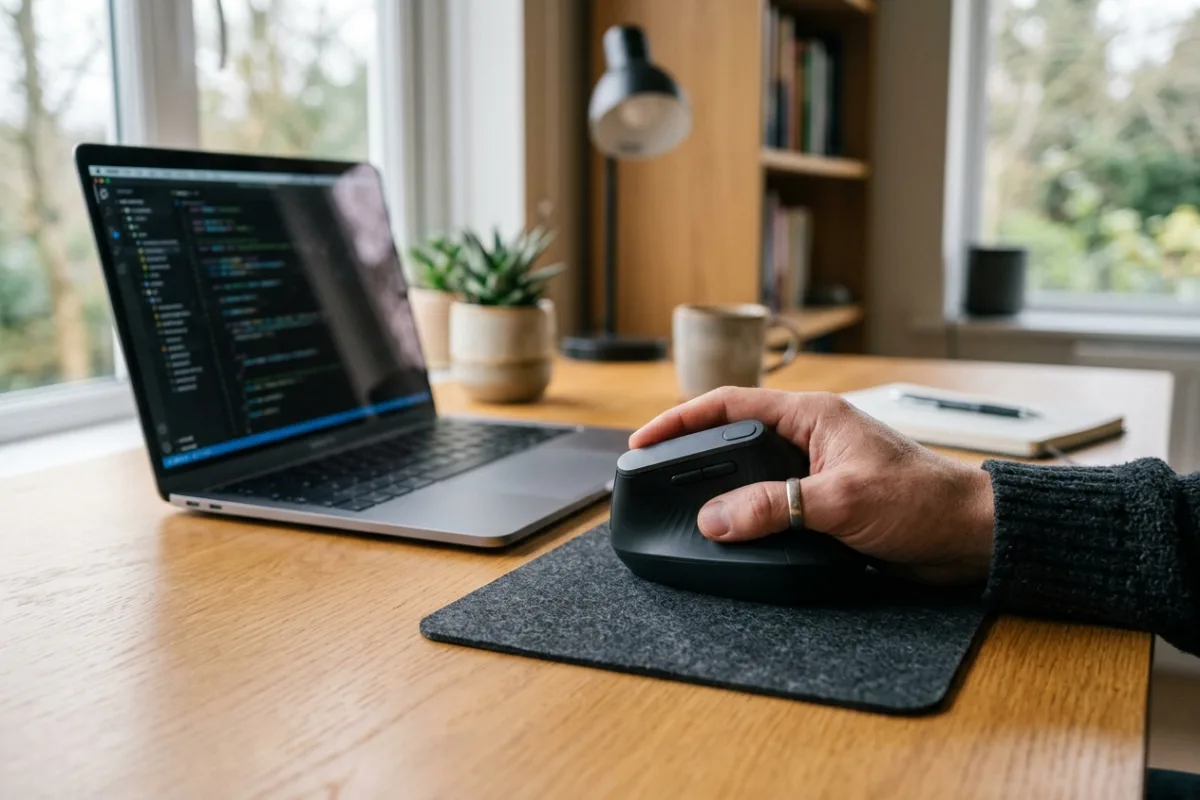
By the third hour of back-to-back video calls and spreadsheet work, your wrist starts to ache from twisting flat against a standard mouse all day. Switching between a work laptop and a personal desktop across the room adds friction if the mouse cannot reconnect quickly. Many entry-level vertical mice are sized for an average palm, leaving anyone with a longer hand cramped around the grip. What an ordinary office day calls for is a vertical mouse shaped for a fuller hand, precise enough for detailed spreadsheet selection, and able to move between devices without swapping a dongle.
This review is built from published manufacturer specifications and the current product documentation for the vertical ergonomic mouse category, not from a laboratory test bench. It compares the ProtoArc EM11 Pro Vertical Ergonomic Mouse against the rivals a shopper actually sees beside it, for one clearly defined household job.
The verdict
For a home office desk shared between a laptop and a desktop, the ProtoArc EM11 Pro is the strongest vertical mouse in this category on paper. Its 58-degree grip and 7.5 to 8.5 inch hand sizing target exactly the medium-to-large range that flatter, smaller vertical mice tend to underserve. The dual Bluetooth channels plus a 2.4 GHz receiver let it hold three paired devices at once, more switching flexibility than the rival mice covered here. Combined with a 7200 DPI ceiling for fine cursor control, it is the more complete choice for anyone splitting work across more than one machine.
Check the current listing →ProtoArc EM11 Pro Vertical Ergonomic Mouse at a glance
These are the published specifications that matter most for the use case above. Manufacturers revise hardware between production runs, so confirm the current listing before ordering.
| Vertical Angle | 58 degrees |
|---|---|
| Sensor Resolution | Up to 7200 DPI across 6 adjustable levels |
| Buttons and Scroll | 6 programmable buttons with a horizontal side scroll wheel |
| Connectivity | 2 Bluetooth channels plus a 2.4 GHz USB-A receiver, up to 3 paired devices |
| Battery | 500 mAh rechargeable battery, charges via USB-C |
Why it wins this category
A better spec sheet is only useful when it removes work from a real routine. These are the four places where the ProtoArc EM11 Pro Vertical Ergonomic Mouse changes the outcome rather than the marketing copy.
Sized for Larger Hands
Most budget vertical mice, including the Anker and Kensington models here, are built around an average palm and leave extra length unsupported. The EM11 Pro is specified for hands measuring 7.5 to 8.5 inches, so the ring and pinky fingers rest on the body instead of curling off the edge, which matters most during long stretches of spreadsheet work or document review.
Three-Device Bluetooth Switching
Both rival mice reviewed here connect through a single 2.4 GHz receiver and stop working the moment that dongle is unplugged or misplaced. The EM11 Pro pairs two Bluetooth channels alongside its own receiver, so it holds three devices at once and moves between a laptop and a desktop without re-pairing anything.
Higher DPI Ceiling
Where the Anker vertical mouse tops out at 1600 DPI and the Kensington model sits in the same range, the EM11 Pro's published sensor reaches up to 7200 DPI across six adjustable levels. For detailed spreadsheet cell selection or precise photo cropping, that extra headroom means less mouse travel for the same on-screen movement.
Rechargeable, Not Disposable
Both budget rivals here run on a single AA or AAA battery that needs periodic replacement. The EM11 Pro instead carries a 500 mAh rechargeable cell charged over USB-C, which the manufacturer lists as good for roughly 200 days per charge, cutting out the recurring cost and clutter of loose batteries in a desk drawer.
How it compares to the alternatives
Each of these is a capable product with a real audience. The question is not whether they work, but which one fits the job described above with the least compromise.
Logitech MX Vertical
Premium ergonomic mouse with a flagship-level sensor and finish
Where it is strong: Logitech's MX Vertical pairs a refined 57-degree grip with a 4000 DPI sensor and Logitech Flow multi-computer control, backed by a well-known brand and a long software support history.
Where it falls short here: Its published pairing tops out at two devices instead of three, its grip is not specifically sized for larger hands the way the EM11 Pro's is, and it sits a step above entry-level pricing rather than the accessible tier the EM11 Pro occupies.
Anker 2.4G Wireless Vertical Ergonomic Optical Mouse
Budget vertical mouse for basic everyday desk use
Where it is strong: Anker's vertical mouse is simple to set up and inexpensive, and its 2.4 GHz receiver pairs instantly with almost any computer without installing extra software.
Where it falls short here: It only reaches 1600 DPI, relies on a single 2.4 GHz receiver instead of Bluetooth, runs on replaceable AAA batteries rather than a rechargeable cell, and its published sizing does not target larger hands the way the EM11 Pro does.
Kensington Pro Fit Ergo Vertical Wireless Mouse
Office-standard vertical mouse with a shallower wrist angle
Where it is strong: Kensington's Pro Fit Ergo uses a gentler 46.7-degree slope with an extended pinky rest and ships with desktop software for reassigning buttons and cursor speed.
Where it falls short here: Its DPI tops out near 1600, it connects through only a single nano receiver with no Bluetooth option, and it depends on one AA battery rather than the rechargeable, three-device setup the EM11 Pro offers.
Weighed against those three, the ProtoArc EM11 Pro Vertical Ergonomic Mouse remains the one that covers this scenario end to end without asking you to accept a workaround somewhere else.
Who it fits
Spreadsheet and Data-Heavy Roles
Anyone who spends hours selecting cells, dragging formulas, or scrolling through long reports benefits from the higher DPI ceiling and side scroll wheel, which make fine cursor movement and horizontal scrolling through wide spreadsheets less repetitive on the wrist.
People Switching Between Laptop and Desktop
With two Bluetooth channels and a 2.4 GHz receiver covering three devices, this mouse fits anyone who works from a laptop during the day and a desktop at a fixed station, without re-pairing hardware every time they move.
Medium to Large Hands
The 7.5 to 8.5 inch hand-size guidance means the body, thumb rest, and pinky ledge are shaped for a fuller palm, so users who found smaller vertical mice cramped finally have somewhere for every finger to rest.
What to be realistic about
No product is the right answer for every household. Skip this one, or plan around these points, if any of them describe your situation.
- If your hand measures under about 7 inches, the manufacturer's own sizing guidance suggests this body will feel oversized and push your fingers into an awkward reach.
- Anyone who needs certified medical-grade ergonomic support for a diagnosed repetitive strain injury should consult an occupational therapist rather than choosing a mouse from marketing copy alone.
- If you only ever work from a single desktop and never move between rooms or devices, the multi-device Bluetooth switching here is a feature you will likely never use.
Living with it after week one
Out of the box, charge the mouse fully over USB-C before first use, then pair it over Bluetooth to your primary laptop and again to a second device, keeping the 2.4 GHz receiver free for a third. Open the browser-based ProtoArc Web HUB in Chrome or Edge to remap the six buttons and side scroll wheel to match your actual workflow instead of the defaults. Once a week, top off the battery rather than letting it fully drain, and wipe the grip surface with a dry cloth so oils from your palm do not build up on the vertical sides.
Frequently asked questions
Is the ProtoArc EM11 Pro compatible with Mac and Windows?
Yes. The manufacturer lists compatibility with Windows 8 or later and macOS 10.12 or later, plus Android 4.3 or later for mobile pairing. Button remapping and DPI adjustments run through the browser-based ProtoArc Web HUB in Chrome, Edge, or Opera, so there is no separate desktop application to install on either platform.
Will this mouse fit someone with small or narrow hands?
On paper it is sized for hands between 7.5 and 8.5 inches, which covers medium to large hands rather than smaller ones. If your hand falls well below that range, the manufacturer's own guidance points toward a smaller vertical mouse instead, since the body and thumb rest are shaped for a fuller grip.
Can it replace a mouse for someone with existing wrist pain?
It is not a medical device, and its 58-degree vertical grip is described here only as a more neutral wrist position based on published design specifications. Anyone with a diagnosed condition like carpal tunnel syndrome should talk to a doctor or occupational therapist before choosing any mouse as a treatment.
Keep reading
Related guides
 Home Office
EC200 Cleaning and Care
Check EC200 mesh and cushion care against the intended home-office routine without assuming that washable, removable or disinfectable are equivalent.
Read guide → Home Office
EC200 Recline Resistance
Separate EC200 reclining resistance from the angle lock, then check control reach and workstation fit before choosing a chair for recline breaks.
Read guide → Home Office
EC300 Seat Width
Separate EC300 cushion width, fixed-arm clearance and overall chair width before assuming a listing dimension guarantees comfortable seated space.
Read guide →