
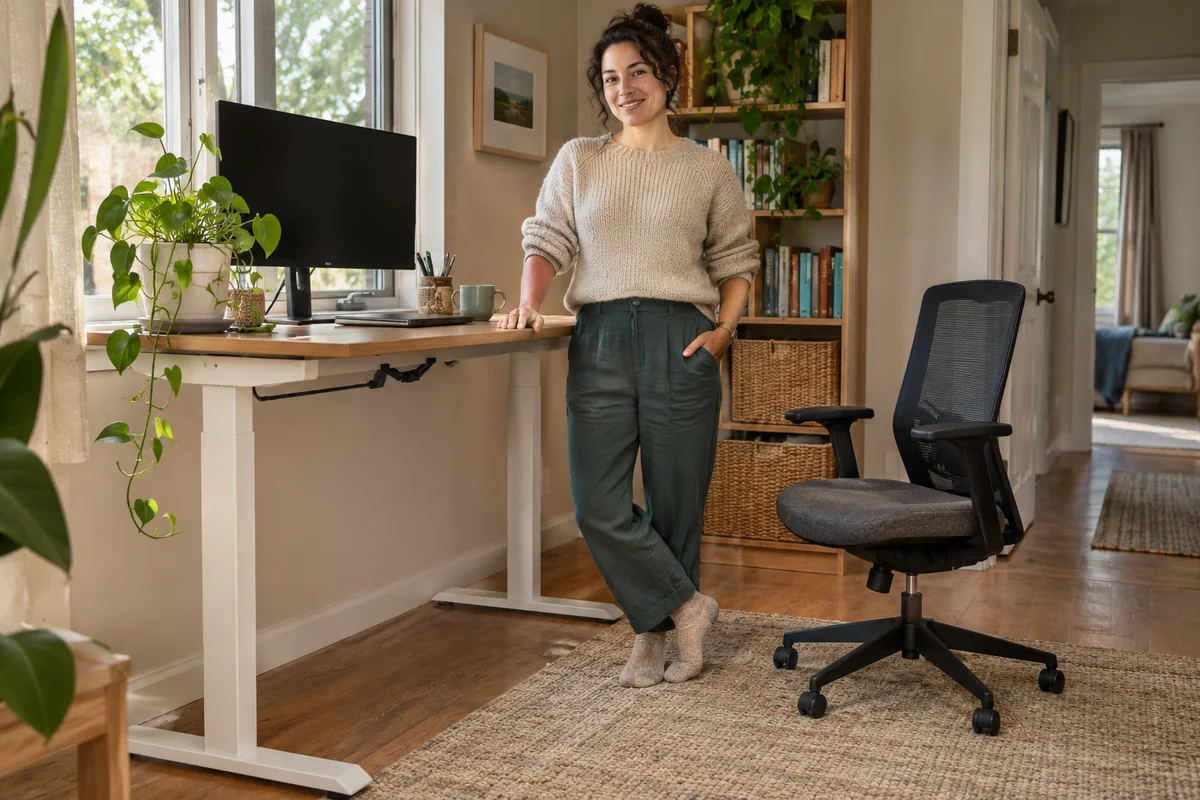
AI-generated scene illustration; not a photograph of the recommended product.
A home worker raises the desk for an afternoon call and leaves the EC300 chair tucked underneath. Lowering the desk later introduces a different problem from finding a comfortable seated height: the desktop and frame move toward the chair’s arms, backrest and anything stored below.
Before combining ProtoArc EC300 with a standing desk, plan that transition. A chair can fit the seated workstation while still being an obstruction during the desk’s movement. More chair adjustments do not automatically solve that second task.
The short answer
Assess sitting fit and desk movement separately. Establish a clear supported parking position for EC300 before moving the desk, and follow the exact desk’s instructions for obstacles, cords, controls and children.
Do not treat an anti-collision feature as permission to lower the desk onto the chair. Nor does a saved desk height prove that the route is clear today. This guide has not tested a desk-chair pair or established a universal clearance distance.
Contents
- The short answer
- Two working states
- The moving boundary
- Chair adjustments
- Anti-collision boundaries
- Cable travel
- Shared-room control
- The transition card
- Purchase tradeoffs
- Buying advice
- Frequently asked questions
- Sources and verification
Two working states
Describe the seated and standing arrangements first. In the seated state, the chair must suit the person’s actual desk task. In the standing state, the chair needs a legitimate place that does not block the user’s route, a doorway or another household activity.
The transition between those states is a third requirement. It changes the position of the desktop and frame relative to objects that did not move. That makes a parked chair, drawer, accessory or cable relevant even if the room has plenty of floor space.
Our small-office clearance guide covers the room during chair movement. This article adds the standing desk’s powered vertical travel and the handoff between two working arrangements.
The moving boundary
Read the desk’s exact assembly and safety instructions. Identify what moves with the desktop, what remains on the floor and what belongs to the chair. Do not estimate those relationships solely from desktop dimensions.
For example, the current UPLIFT V3 instructions require checking the surroundings for obstacles and keeping body parts clear. That guidance applies to that desk; obtain the corresponding instructions for another model.
A small underside accessory can change the useful space. Include any approved keyboard tray, drawer, frame member or cable management component. A clear top surface does not prove a clear area underneath.
Chair adjustments
ProtoArc’s EC300 information describes adjustable components, including the seat, backrest and headrest. These help define a supported chair setup, not a single height guaranteed to fit every desk in motion.
Measure the relevant overall chair configuration with manufacturer guidance when needed. Seat height and armrest height describe different relationships. Lowering a seat to tuck in the arms is not automatically a suitable seated working position.
Do not remove structural parts, substitute fasteners or force a control to gain clearance. If the required configuration is not supported, change the desk arrangement, chair choice or parking plan rather than modifying furniture around an assumption.
Anti-collision boundaries
Some standing desks offer collision detection, but its presence does not replace the instruction to keep obstacles out of the movement path. The exact model, setup and manufacturer limitations still apply.
Do not intentionally put a chair, hand, pet or valuable object in the path to see whether the feature stops in time. This is purchase planning, not a test procedure for a safety feature.
A saved height is also a control setting rather than a live check of the room. Someone may have changed the chair, placed a bag below the desk or moved a cable since the setting was saved. Review the actual surroundings before movement as the desk instructions require.
Cable travel
List devices that move with the desk and those that do not. The UPLIFT instructions specifically address sufficient cord slack as the desk changes height. That is different from simply making cables look tidy in the seated position.
Use the desk and accessory manufacturers’ supported cable arrangements. Do not stretch a power cord, run a lead through chair wheels or improvise a tight loop around a moving component.
Keep charging and signal connections distinct in the plan. A cable that reaches in one state may be strained in another. Address that supported routing question before introducing the chair to the parking area, rather than using the chair as an anchor or cable support.
Shared-room control
Agree who moves the desk and where the chair goes first. A household member using the same room should not have to guess whether a tucked-in chair is clear of the desk’s permitted travel.
Follow the exact instructions for control locks and supervision. The cited UPLIFT manual includes child-related warnings and control precautions, but those details should not be assumed identical for another desk.
Do not leave a plan that depends on an unsupervised child or pet avoiding a moving structure. If the room cannot support the required control and clear area, choose a suitable stationary arrangement instead of relying on an extra furniture feature.
The transition card
| Stage | Decision to establish |
|---|---|
| Seated work | Supported chair and task fit |
| Before movement | Chair parked clear and surroundings checked |
| Desk travel | No interfering objects or strained cords |
| Standing work | Chair storage leaves normal routes open |
| Return | Current surroundings rechecked before lowering |
| Shared use | Responsibility and controls understood |
Record the actual desk model and relevant instructions beside the card. Do not write a universal numerical gap copied from an unrelated desk or infer one from EC300’s recline angle.
If an appropriate permitted evaluation is available, follow the manufacturers’ process without deliberate collision. Stop when a measurement or instruction is unresolved. A tape measure and written support answer are more useful than an improvised impact demonstration.
Purchase tradeoffs
A chair with more adjustment range can still be the wrong match if no safe parking position exists. Conversely, a suitable EC300 does not need to be replaced just because the current desk layout is poorly organized.
Compare a supported layout change, a different desk accessory arrangement and an alternative suitable chair. Do not assume the most expensive option creates more usable space or better control.
Consider the effort of repeating the transition on an ordinary busy day. A plan that requires moving several unrelated objects each time may be inconvenient enough that the household stops following it. Simpler supported furniture can be the better purchase.
Buying advice
Consider EC300 when it suits the seated task and the exact standing desk can operate with a clear, manageable parking and cable plan. Establish both conditions before treating a promotional photograph as a complete workstation.
Pass when the setup depends on collision detection repeatedly stopping against the chair, an unsupported component change or a blocked route. More recline settings do not resolve a moving-desk conflict.
The EC300 overview covers broader features. Confirm the selected seller’s actual model, delivery, permitted assessment and return terms. The partner CTA is for the chair, not a standing desk or a jointly certified workstation.
Frequently asked questions
Does seated fit prove movement clearance?
No. Desk travel introduces another moving boundary and must be assessed separately.
Can anti-collision clear the chair?
Do not use it as a clearance gauge. Follow the desk’s obstacle and supervision instructions.
Is seat height the relevant dimension?
It is only one dimension. Arms, backrest, underside accessories and the frame also matter.
Are saved heights sufficient?
No. They do not confirm that the current space is free of a newly placed obstruction.
Sources and verification
Checked November 4, 2026. EC300 documentation and the actual UPLIFT V3 safety PDF reviewed; no collision, room-fit or joint-product test.
Keep reading
Related guides
 Home Office
EC200 Sim Racing Seat Limits
Compare EC200 office seating with a sim-racing setup through pedal reaction, rolling movement and explicitly supported equipment arrangements.
Read guide → Home Office
EC300 Small-Office Clearance
Assess EC300 in a narrow home office through desk approach, caster movement, recline space and an unobstructed exit before buying a larger chair.
Read guide → Home Office
EC300 Trial and Return Planning
Plan an EC300 purchase around the actual seller, permitted assembled-chair trial, return costs and a repeatable fit record before ordering online.
Read guide →