
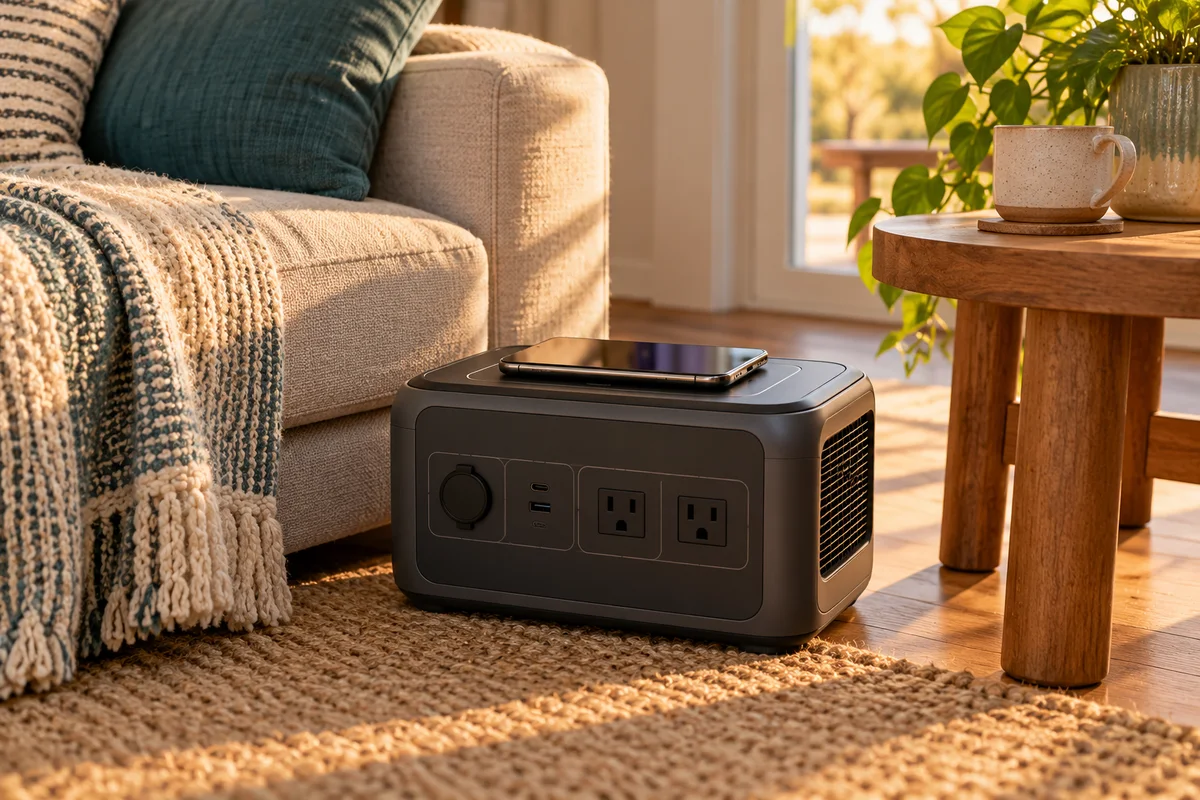
AI-generated scene illustration; not a photograph of the recommended product.
The household has a backup battery, but the phone cable is upstairs when the lights go out. A wireless pad on the AC180 looks like a convenient place to leave the phone while finding a flashlight. That convenience is real only if the phone actually accepts wireless charging and stays correctly positioned.
Treat the pad as one charging option, not the main reason to buy a large power station. A small supported power bank may solve a phone-only need with much less equipment. For a household already comparing AC180 for other loads, the useful question is whether this extra output simplifies a repeatable routine.
The short answer
The AC180 has a wireless charging pad rated up to 15W. Its manual places wireless charging under the DC output control. That rating is a ceiling, not a promise that every phone receives 15W or reaches a particular percentage in a set time.
Confirm the exact phone’s wireless-charging requirements, case restrictions and observed charging indication. Keep a compatible wired route available. Do not assume MagSafe attachment, Qi2 magnetic alignment or a particular fast-charging profile merely because a product has a wireless pad.
Contents
- The short answer
- Check the handset before rearranging the room
- Make the first check observable
- Deal with the case and the things inside it
- Separate convenience from charging speed
- Plan access, not just a charging spot
- Choose the route with the fewest surprises
- Frequently asked questions
- Sources and verification
Check the handset before rearranging the room
Start with the phone manufacturer’s specifications. A USB charging port does not establish wireless capability. Likewise, a protective case advertised as magnetic does not prove that a particular charger and handset combination is approved.
For iPhone owners, Apple’s wireless-charging guidance is a useful starting point. It explains positioning and case-related troubleshooting. It does not certify a specific AC180 pairing, so retain the distinction between general handset guidance and station compatibility.
Write the exact phone model on the household charging note. “The newer phone” becomes ambiguous as devices move between family members. If two people use different handsets, check both rather than transferring the result from one to the other.
Decide whether a work phone must remain available for authentication or calls. Its place in the plan may be a predictable wired connection, even when a personal phone works acceptably on the pad.
Make the first check observable
Read the AC180 instructions, enable the appropriate DC output, and place only the supported phone on the designated charging area. Check the handset’s charging indication rather than relying on the station being awake.
Leave the equipment stable and ventilated. Keep liquids and loose metal objects away. The pad is not permission to stack belongings over the station or cover cooling openings with a bag or towel.
Record a simple result: charging began, the phone stayed positioned, and it remained convenient to retrieve. A brief observation does not measure efficiency, establish a full-charge time or prove reliable overnight operation.
If charging fails, use the phone and station manufacturers’ supported troubleshooting. Stop if either device reports a problem. Do not repeatedly reposition a damaged handset or modify a case to force compatibility.
Deal with the case and the things inside it
Wallet attachments, cards and metal accessories deserve attention before the phone goes on a charger. Follow the handset maker’s directions about items between the phone and charging surface; do not use a charging check as an experiment with payment cards.
Apple advises checking thick, metal or battery cases when wireless charging is slow or unsuccessful. Whether removing a particular accessory is appropriate still depends on the phone and case instructions.
A household can make this practical without creating a complicated ritual. Give removable accessories a separate small tray, away from the station’s vents. Keep the phone visible so another person does not mistake it for an unattended object and move it.
If the normal case must repeatedly come off, include that friction in the purchase decision. A wired cable that works with the case intact may be the easier everyday answer.
Separate convenience from charging speed
A maximum wattage belongs to the charger specification; the complete pairing determines what actually happens. Handset limits, supported profiles, battery state and temperature-related behavior can affect charging.
Avoid using the AC180’s advertised 15W as an iPhone fast-charge guarantee. Apple describes different charging behavior across accessory arrangements. Nothing in a generic wireless label proves magnetic charging features or a specific handset result.
For a practical comparison, use the same phone and an ordinary short session on each supported route. Note whether the phone gains charge while doing the task you need. Treat that as your observation, not a benchmark for other owners.
If the phone must recharge quickly before leaving, prefer an explicitly supported fast wired arrangement rather than assuming a pad’s convenience makes it the fastest choice.
Plan access, not just a charging spot
A phone on the station may be inconvenient to answer if the battery sits on a low floor position. Choose the station’s safe location first; do not move heavy equipment onto unsuitable furniture just to raise the handset.
Keep retrieval clear of other appliance leads. A person reaching for a ringing phone should not pull a lamp cable or disturb equipment. The wireless benefit disappears if getting the phone creates another household obstacle.
Our bedside charging-station guide addresses daily access and cable organization. An outage setup has different placement and ventilation constraints, so adapt the idea rather than copying the bedside arrangement unchanged.
For the wider energy task, use the router and laptop backup worksheet. Phone charging is one demand within that plan, not a reason to ignore the other devices.
Choose the route with the fewest surprises
| Need | Sensible starting point |
|---|---|
| Phone does not support wireless charging | Approved wired charging |
| Known compatible phone, brief convenient top-up | Verified pad arrangement |
| Case removal is awkward every time | Compare a case-compatible cable |
| Essential phone must recharge before departure | Confirm the exact supported fast-charge path |
| Only a phone needs backup | Compare an appropriately sized power bank first |
Consider AC180 when its broader capacity, outputs and placement fit the household. Treat wireless charging as a useful secondary convenience. Pass on a station-sized purchase if your real requirement is simply one phone away from a wall socket.
Check the current partner listing for the exact AC180 and supplied accessories. Manufacturer-store availability can differ from the partner seller, and no immediate delivery promise is made here. No phone pairing, speed or charging-efficiency test was performed for this article.
Frequently asked questions
Does 15W mean my phone always receives 15W?
No. It is the pad’s maximum rating; the phone and supported pairing determine actual charging behavior.
Must the AC output be on for the pad?
The AC180 manual groups wireless charging with DC output. Follow the DC-control instructions for your unit rather than enabling AC simply because it is a power station.
Can I assume the pad magnetically holds an iPhone?
No. Wireless charging alone does not establish magnetic alignment or a specific MagSafe or Qi2 implementation.
Should I discard the phone cable?
No. Keep a compatible wired alternative, especially for essential communication or when the normal case interferes.
Sources and verification
Checked October 20, 2026. This is a compatibility and household-use decision guide, not a measured charging review.
- BLUETTI AC180 US manual: specifications and DC controls
- Apple: charging an iPhone wirelessly
- AC180 current manufacturer listing and availability notices
Keep reading
Related guides
 Power & Outdoors
AC180 12V Outlet: Check the Load, Not Just the Plug
Match AC180's regulated 12V car-style output to an appliance's voltage, current and approved cable instead of relying on socket shape.
Read guide → Power & Outdoors
Elite 100 V2 Power Lifting Is Not 2,700W Output
Separate Elite 100 V2 continuous output, Power Lifting and appliance compatibility before buying a station around a high-wattage label.
Read guide → Power & Outdoors
AC180 Home Backup: Keep Power Out of Wall Outlets
Separate directly powered appliances from household wiring before buying an AC180 for outages; rule out backfeeding and plan the right system.
Read guide →