
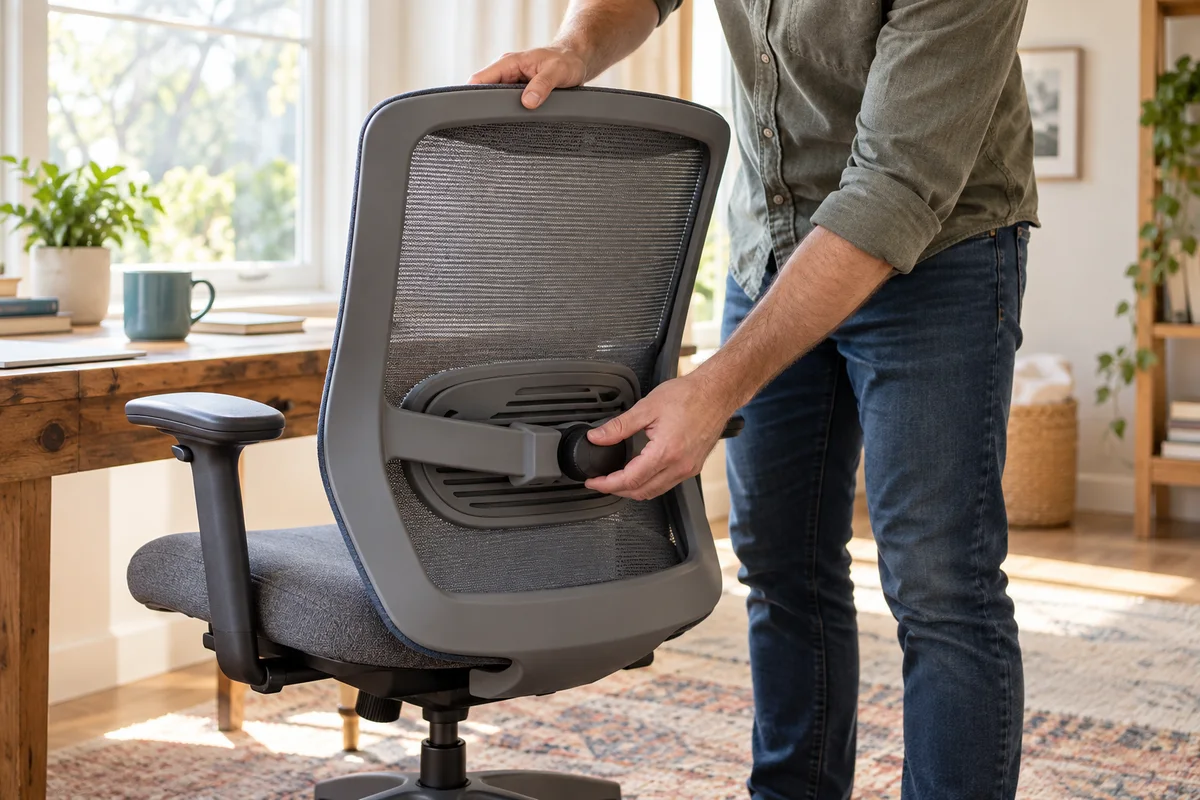
AI-generated scene illustration; not a photograph of the recommended product.
You turn the knob on a new EC200 and the lower-back support feels more pronounced, but it is still too low. Turning farther will not necessarily solve that problem. The chair has two different lumbar adjustments, and each answers a different fit question.
Before ordering another chair or an aftermarket cushion, identify whether the support needs to move vertically or change how strongly it projects. This is a practical buying and setup check, not a treatment for back pain.
The short answer
ProtoArc’s EC200 FAQ separates a sliding height adjustment from a knob that changes support strength. It describes holding both sides of the lumbar panel’s upper edge to move it evenly, and turning the knob counterclockwise for more support or clockwise for less. Follow the instructions for your actual version rather than transferring a recline-knob direction.
Establish an ordinary seated position first. A support that reaches your lower back but feels too prominent needs a different decision from one that cannot reach the intended position. Neither adjustment proves that the chair fits every person.
Contents
- The short answer
- Diagnose the mismatch in ordinary language
- Identify the correct control
- Assess height before strength
- Make a repeatable fit note
- Separate adjustment limits from a support issue
- Buying advice
- Frequently asked questions
- Sources and verification
Diagnose the mismatch in ordinary language
Start with a sentence that describes the observation, without naming a broken part: the panel sits below the useful contact area; the contact is too strong; the chair pushes you away from the back; or the panel changes position unexpectedly. Those observations are more useful than saying the lumbar support is bad.
Keep chair settings and work activities separate. If you are leaning forward to reach the keyboard, changing the panel may not address the reason you stopped using the backrest. Check the keyboard position, desk clearance and ordinary seat position before attributing everything to lumbar support.
Our shared-chair setup guide covers the whole workstation handover. This page isolates the EC200’s two lumbar controls so that a household does not repeatedly change the wrong variable.
Identify the correct control
A knob under the seat can control reclining resistance, while the lumbar adjustment serves a different mechanism. Look at the current model instructions and the actual component before turning anything. Similar shapes do not establish identical functions.
For the lumbar panel, use the supported adjustment method and stay within normal movement. Do not remove covers, tighten a hidden fastener, glue a sliding component or add an improvised clamp because another owner’s chair appears similar. A support mechanism that will not hold its position needs model-specific help.
The manufacturer’s knob directions are not universal furniture rules. In particular, do not memorize clockwise as always tighter or always more supportive. Keep the control name beside its direction in any household note. That small distinction prevents a well-intended adjustment from undoing another person’s setup.
Assess height before strength
Move through the supported vertical adjustment without forcing the panel. Sit back naturally and assess where contact occurs. There is no useful reason to maximize the height simply because a taller setting exists.
If the height range cannot place support usefully while the rest of the chair fits, note that limitation. A second cushion might change the effective seat space or push you forward, rather than turn the existing mechanism into a different size. Do not make an accessory the assumed solution before understanding the mismatch.
Once height is in a reasonable position, compare support strength conservatively. Change one control at a time and return to the same ordinary task. Changing seat depth, recline, desk position and lumbar strength together makes it difficult to know what helped.
Make a repeatable fit note
A simple private note can contain the activity, initial seat position, lumbar height reference, direction of the last strength adjustment and result. Use everyday observations such as easier to sit back or contact still too prominent. Do not invent a pressure score or a clinically ideal angle.
For a shared chair, create a starting reference for each user without marking or damaging the chair. Avoid placing personal body measurements in a public office label. The note should help someone return to a familiar setting, not prescribe a position to hold all day.
After a normal work period, reassess whether the settings remain useful. A brief seated impression cannot establish long-session comfort. Allow movement and changes of activity; an adjustment feature is not evidence that continuous sitting is desirable.
Separate adjustment limits from a support issue
If movement is uneven, the panel will not retain a supported position, or the chair has visible damage, stop improvising. Send the manufacturer the exact model, order details and a clear description. A short video of normal permitted movement can be more helpful than repeated attempts to force a lock that the instructions do not describe.
Ask a precise question: is this amount of movement expected, and what is the approved next step for this version? Do not accept a generic statement about ergonomic design as an answer to a mechanical problem.
Keep any warranty or return route separate from personal fit. A chair may operate as designed and still not fit its user. Conversely, a manufacturing issue should not be dismissed as a matter of preference simply because comfort is subjective.
Buying advice
EC200 belongs on a shortlist when its actual seat dimensions, supported user limits and lumbar range fit your workspace. The EC200 review provides the broader product context. Confirm the selected seller’s exact version and conditions before ordering.
Prefer an alternative when the useful support position remains outside the available range, or when buying depends on a promised medical benefit. Persistent discomfort deserves appropriate professional advice, not increasingly aggressive knob adjustments.
For an existing owner, a supported setting change or an approved replacement component may be more proportionate than replacing the entire chair. For a new buyer, understanding these controls is valuable only alongside a realistic fit assessment and workable return arrangements.
Frequently asked questions
Does the lumbar knob raise the panel?
The FAQ describes height and support strength separately. Identify the panel’s supported sliding adjustment rather than treating the strength knob as a height control.
Is more support strength always better?
No. The useful setting depends on personal fit and the whole workstation. Do not equate a more prominent contact with a health benefit.
Can I fix slipping by modifying the panel?
Do not improvise a repair or lock. Ask ProtoArc about the exact mechanism, version and approved support route.
Should I add a cushion before trying the controls?
First establish what the existing adjustments do. An extra cushion changes the seating arrangement and is not automatically compatible or helpful.
Sources and verification
Checked October 24, 2026. Manufacturer instructions were reviewed; no physical chair trial or medical assessment was performed.
- ProtoArc EC200 FAQ — separate lumbar controls and directions.
- EC200 official product specifications — model and adjustment context.
Keep reading
Related guides
 Home Office
EC200 Headrest Reset: Move Forward Before Backward
Read the EC200 headrest's forward-release sequence before forcing it backward, then check whether its supported position fits your actual work.
Read guide → Home Office
EC200 vs EC200 Pro: Verify the Seat Material
Compare EC200 foam-seat information with the regional EC200 Pro all-mesh listing without transferring accessories or availability between markets.
Read guide → Home Office
EC300 Seat Height: Check the Rear Lever First
Separate EC300 seat-height control, the documented loaded or unloaded method and unresolved faults before buying a gas lift or modifying the chair.
Read guide →